Checkout is easypay's integrated solution for collecting payments in any website with minimal development effort.
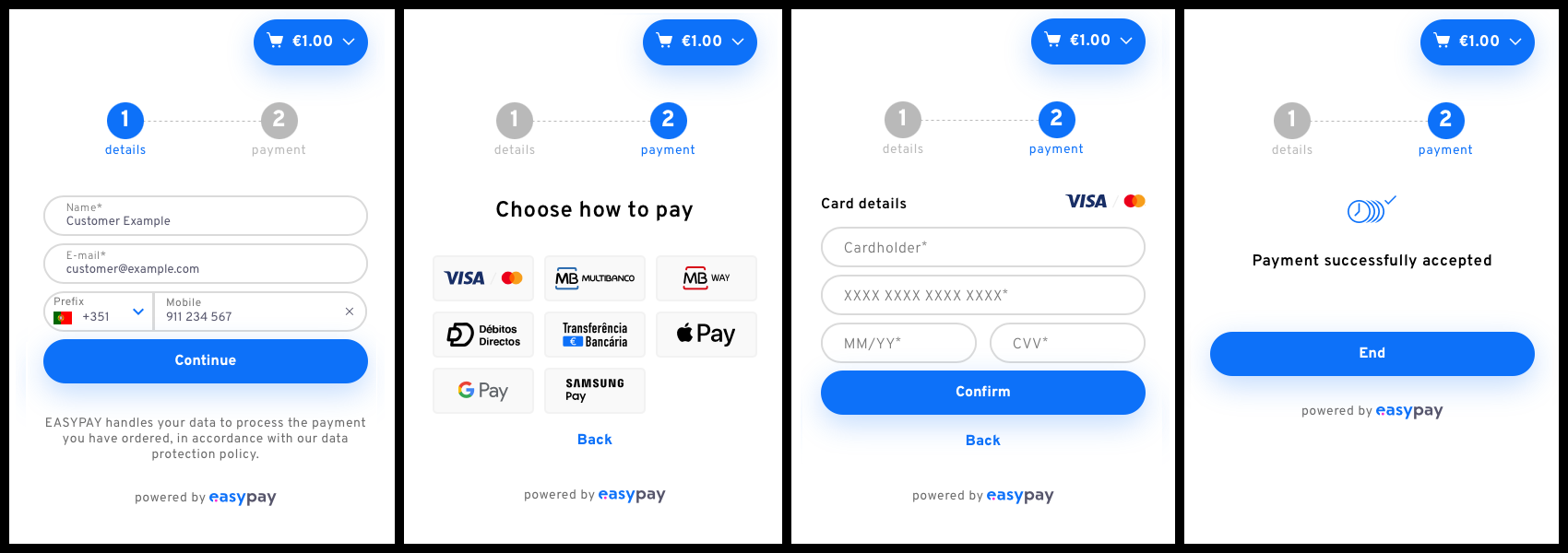
Checkout is a pre-built payment form that you can embed directly into your website. It handles the entire payment flow including:
- Collecting customer information
- Payment method selection
- Payment information collection
- Invoking payment APIs
- Displaying payment feedback
- No extensive programming required: Embed with just a few lines of code
- All payment methods supported: Credit cards, MB WAY, Apple Pay, Google Pay, Samsung Pay, Multibanco, Direct Debit, Virtual IBAN
- All payment types supported: Single, Frequent, and Subscription payments
- Fully customizable: Match your brand with extensive styling options
- Mobile responsive: Works seamlessly on all devices
- Multiple integration methods: Script tag or NPM package
Explore the live Checkout demo to see the solution in action and try different payment flows.
View the source code on GitHub with instructions for running locally.
Make a server-to-server POST request to create a checkout session:
curl -X POST 'https://api.test.easypay.pt/2.0/checkout' \
  -H 'AccountId: YOUR_ACCOUNT_ID' \
  -H 'ApiKey: YOUR_API_KEY' \
  -H 'Content-Type: application/json' \
  -d '{
    "type": ["single"],
    "payment": {
      "methods": ["cc", "mb", "mbw", "dd", "vi"],
      "type": "sale",
      "currency": "EUR",
      "capture: { "descriptive": "Purchase in MyStore" }
    },
    "order": {
      "items": [
        {
          "description": "T-shirt",
          "quantity": 1,
          "key": "t-shirt",
          "value": 12.50
        }
      ],
      "key": "order-123",
      "value": 12.50
    }
  }'
Response:
{
  "id": "57cc19e9-f393-4cfa-9516-8807763b5096",
  "session": "8zoaBOC0Mj5Mg_YAbdRCqY...",
  "config": null
}
This response is called the Checkout manifest.
<!-- Include the SDK -->
<script src="https://cdn.easypay.pt/checkout/2.9.1/"></script>

<!-- Prepare a container -->
<div id="easypay-checkout"></div>

<script>
  // Get the manifest from your server
  const manifest = await getManifestFromServer();

  // Initialize Checkout
  easypayCheckout.startCheckout(manifest);
</script>npm install --save @easypaypt/checkout-sdkimport { startCheckout } from "@easypaypt/checkout-sdk";
const manifest = await getManifestFromServer();
startCheckout(manifest);For one-time purchases:
{
  "type": ["single"],
  "payment": {
    "methods": ["cc", "mbw", "mb"],
    "type": "sale",
    "currency": "EUR"
  },
  "order": {
    "items": [
      { "description": "Product", "quantity": 1, "value": 29.99 }
    ],
    "value": 29.99
  }
}To save payment details for future use:
{
  "type": ["frequent"],
  "payment": {
    "methods": ["cc", "mbw", "dd"],
    "currency": "EUR"
  }
}
Handle the success callback to get the payment ID:
startCheckout(manifest, {
  onSuccess: (checkoutInfo) => {
    // Save checkoutInfo.payment.id for later captures
    saveTokenToServer(checkoutInfo.payment.id);
  }
});
Later, capture funds using the saved ID:
POST /capture/:id
{
  "value": 50.00,
  "descriptive": "Purchase in MyStore"
}For recurring payments:
{
  "type": ["subscription"],
  "payment": {
    "methods": ["cc", "dd"],
    "type": "sale",
    "frequency": "1M",
    "start_time": "2024-02-01 00:00",
    "max_captures": 12
  },
  "order": {
    "items": [
      { "description": "Monthly Subscription", "value": 9.99 }
    ],
    "value": 9.99
  }
}
Inline Mode (default): Embeds the checkout form in your page
startCheckout(manifest, {
  display: "inline"
});
Popup Mode: Opens checkout in a popup/modal
<button id="checkout-button">Pay Now</button>

<script>
easypayCheckout.startCheckout(manifest, {
  id: "checkout-button",
  display: "popup"
});
</script>
React to payment events:
startCheckout(manifest, {
  onSuccess: (checkoutInfo) => {
    console.log('Payment successful:', checkoutInfo);
    // checkoutInfo contains payment details, method, status, etc.
  },

  onError: (error) => {
    console.error('Unrecoverable error:', error);
    if (error.code === 'checkout-expired') {
      // Create new session
    }
  },

  onPaymentError: (error) => {
    console.log('Recoverable payment error:', error);
    // User can retry
  },

  onClose: () => {
    console.log('Checkout closed');
    // Clean up or redirect
  }
});Match your brand with extensive styling options:
startCheckout(manifest, {
  logoUrl: "https://yoursite.com/logo.png",
  accentColor: "#FF6B35",
  backgroundColor: "#F7F7F7",
  buttonBackgroundColor: "#FF6B35",
  buttonBorderRadius: 5,
  inputBorderRadius: 5,
  fontFamily: "Arial, sans-serif",
  baseFontSize: 12
});
Example customization:

Available customization options:
- Company logo
- Background colors
- Accent colors
- Button colors and styles
- Input field colors and styles
- Font family and size
- Border radius
- Box shadows
To test without real transactions:
startCheckout(manifest, {
  display: "inline",
  testing: true  // Use test environment
});Important:
- Create sessions using
https://api.test.easypay.pt - Use test payment methods (see Payment Methods guide)
- Remove
testing: truewhen going to production
Store the instance for later management:
const checkoutInstance = startCheckout(manifest, {
  onSuccess: (info) => {
    // Payment successful, clean up
    checkoutInstance.unmount();
    showThankYouMessage();
  }
});

// Later, manually remove checkout
checkoutInstance.unmount();Checkout sessions expire after 30 minutes. Handle expiration gracefully:
startCheckout(manifest, {
  onError: async (error) => {
    if (error.code === 'checkout-expired') {
      // Create a new session
      const newManifest = await createNewSession();
      startCheckout(newManifest);
    }
  }
});| Error Code | Cause | Solution |
|---|---|---|
| checkout-expired | Session expired (>30 min) | Create new session |
| already-paid | Checkout already completed | Confirm payment status |
| checkout-canceled | Checkout was canceled | Create new session |
| generic-error | General error before payment | Allow retry |
| payment-failure | Error during payment | Allow retry, check details |
Checkout automatically detects the user's browser language, but you can override it:
startCheckout(manifest, {
  language: "pt_PT"  // Portuguese
  // Options: "en", "pt_PT", "es_ES"
});- Always Create Sessions Server-Side: Never expose your API keys in client code
- Handle All Error Cases: Implement error handlers for better UX
- Use Webhooks: Don't rely solely on client-side success callbacks for critical logic
- Test Thoroughly: Use the test environment extensively before going live
- Customize for Your Brand: Match Checkout to your website's look and feel
- Mobile First: Test on various devices and screen sizes
- Verify Payments: Always verify payment status on your server using the API
manifest: The return object from the checkout service.options: An optional object containing any of the following properties:
| Option | Type | Default | Description |
|---|---|---|---|
| id | string | 'easypay-checkout' | The id of the HTML element where the Checkout form should be included. |
| onSuccess | function | () => {} | Callback function to be called when the Checkout is finished successfully. |
| onError | function | () => {} | Callback function to be called on (unrecoverable) errors. |
| onPaymentError | function | () => {} | Callback function to be called on (recoverable) payment errors. |
| onClose | function | undefined | Callback function to be called when the Checkout interaction is closed. |
| testing | boolean | false | Whether to use the testing API (true) or the production one (false). |
| display(1) | string | 'inline' | The display style of the element that hosts the Checkout. |
| showLoading | boolean | false | Whether to show a loading indicator. If shown, it can be customized using the CSS selector .epcsdk-loading::before. |
| hideDetails | boolean | false | Whether to hide the details form or not. An expandable summary will be shown with the details, instead, unless hideDetailsButton is also true. |
| hideDetailsButton | boolean | false | Whether to hide the details button and expandable summary, when hideDetails is true. |
| hideCartButton | boolean | false | Whether to hide the cart button and expandable order summary. |
| hideSubscriptionSummary | boolean | false | Whether to hide the subscription summary or not. |
| language(2) | string | undefined | The language in which to display the Checkout. |
| logoUrl | string | undefined | The merchant logo url to display in the Checkout. |
| backgroundColor | string | '#ffffff' | The color used as the background of the Checkout page. |
| accentColor | string | '#0d71f9' | The color used in highlights, as well as default buttons and input borders. |
| errorColor | string | '#ff151f' | The color used for errors. |
| inputBackgroundColor | string | 'transparent' | The color used for the input backgrounds. |
| inputBorderColor | string | accentColor | The color for input borders. |
| inputBorderRadius | number | 50 | The border radius for inputs, in px. |
| inputFloatingLabel | boolean | true | Whether inputs should use floating labels. |
| buttonBackgroundColor | string | accentColor | The color used for the button backgrounds. |
| buttonTextColor | string | undefined | The color used for the button text. If undefined, a contrasting color will be chosen. |
| buttonBorderRadius | number | 50 | The border radius for buttons, in px. |
| buttonBoxShadow | boolean | true | Whether the buttons should have box-shadow. |
| linkColor | string | '#0d71f9' | The color used for the links text. |
| stepperTextColor | string | undefined | The color used for the stepper text. If undefined, a contrasting color will be chosen. |
| fontFamily | string | 'Overpass' | The font used for the text. |
| baseFontSize | number | 10 | The value in px for the font size of the root element (1rem). |
(1) display available values: inline (default) or popup.
(2) language available values: en (English), pt_PT (Portuguese) or es_ES (Spanish). If left undefined, a default language will be selected according to the customer's browser language.
- A
CheckoutInstanceobject, containing the following method:unmount(): Removes all Checkout form content and event listener.
onSuccess(checkoutInfo)
Receives an object with the following properties:
| Property | Type | Description |
|---|---|---|
| id | string | The id of the Checkout session. |
| type | string | The payment type for this Checkout ('single', 'frequent' or 'subscription'). |
| payment | Object | Detailed information about the payment. |
Note: Some properties only appear with certain payment methods.
| Property | Method | Type | Description |
|---|---|---|---|
| id | All | string | The payment's id. |
| method (1) | All | string | The payment method chosen by the customer. |
| status (2) | All | Object | The status of the payment. |
| value | All | number | The order value, rounded to two decimal places. Not used in frequent payments. |
| cardType | Credit Card | string | The credit card type ('VISA' or 'MasterCard'). |
| lastFour | Credit Card | string | The last four digits of the credit card. |
| cardCountryCode | Credit Card | string | The country code of the credit card. |
| expirationDate (3) | Credit Card / Multibanco | string | The expiration date of the card (Credit Card) or the payment (Multibanco). |
| entity | Multibanco | string | The Multibanco entity. |
| reference | Multibanco | string | The Multibanco reference. |
| sddMandate (4) | Direct Debit | Object | SEPA Direct Debit mandate. |
| iban | Virtual IBAN | string | The created IBAN. |
(1) Possible method values are the same as in the Checkout creation.
(2) Possible payment status values:
Expand
'authorised''deleted''enrolled''error''failed''paid''pending''success''tokenized'(To be Used later infrequentpayments.)'voided'
(3) Format of the expiration varies between Credit Card ('MM/YY' format) and Multibanco ('Y-m-d H:i').
(4) Properties of the sddMandate Object:
Expand
| Property | Type | Description |
|---|---|---|
| accountHolder | string | Name of the account holder. |
| billingEntity | string | The billing entity for the payments. |
| countryCode | string | Country code of the bank account. |
| string | The customer's e-mail address. | |
| iban | string | The IBAN. |
| id | string | The mandate's id. |
| maxNumDebits | string | The maximum number of debits allowed for this Direct Debit. |
| name | string | The customer's name. May be different from the account holder's name. |
| phone | string | The customer's phone number. |
| referenceAdc | string | The authorization reference. |
onError(error)
Receives an object with the following property:
| Property | Type | Description |
|---|---|---|
| code | string | The type of error that occurred. See the table below for possible values. |
The error code has the following possible values and recommended solutions:
| Value | Cause | Recommended solution |
|---|---|---|
| checkout-expired | The Checkout session has expired. | Create a new Checkout session with the server-to-server call and use the newly returned Manifest to instantiate a new Checkout form. |
| already-paid | The Checkout was already paid. | Refresh the order information and confirm that it was paid. Give feedback to the user accordingly. |
| checkout-canceled | The Checkout was canceled. | Create a new Checkout session with the server-to-server call and use the newly returned Manifest to instantiate a new Checkout form. |
| generic-error | There was an error before the payment process had started. | Allow the user to try again. If problem persists, report it to easypay. |
onPaymentError(error)
Signals the occurrence of a recoverable error during a payment attempt. These errors are informative and for logging/analysis purposes, as the user is allowed (and encouraged) to try the payment again with the same or other payment method.
Receives an object with the following properties:
| Property | Type | Description |
|---|---|---|
| code | string | The type of error that occurred. See the table below for possible values. |
| paymentMethod | string | The payment method for which the error happened. |
| checkout | object | On payment-failure errors, the Checkout object containing the payment information that had already been created. Has the same properties as the onSuccess checkoutInfo object. |
The error code has the following possible values and recommended solutions:
| Value | Cause | Recommended solution |
|---|---|---|
| generic-error | There was an error before the payment process had started. | Allow the user to try again. If problem persists, report it to easypay. |
| payment-failure | There was an error after the payment process had started. | Allow the user to try again. If problem persists, use the attached checkout object to get details about the payment intent. |
- Checkout API Reference - Complete API documentation
- Webhooks Guide - Receive payment notifications
- Payment Methods - Learn about available payment methods
- Payment Types - Understand Single, Frequent, and Subscription payments
- GitHub Demo - Full working example