# Checkout
Checkout is easypay's integrated solution for collecting payments in any website with minimal development effort.
## Overview
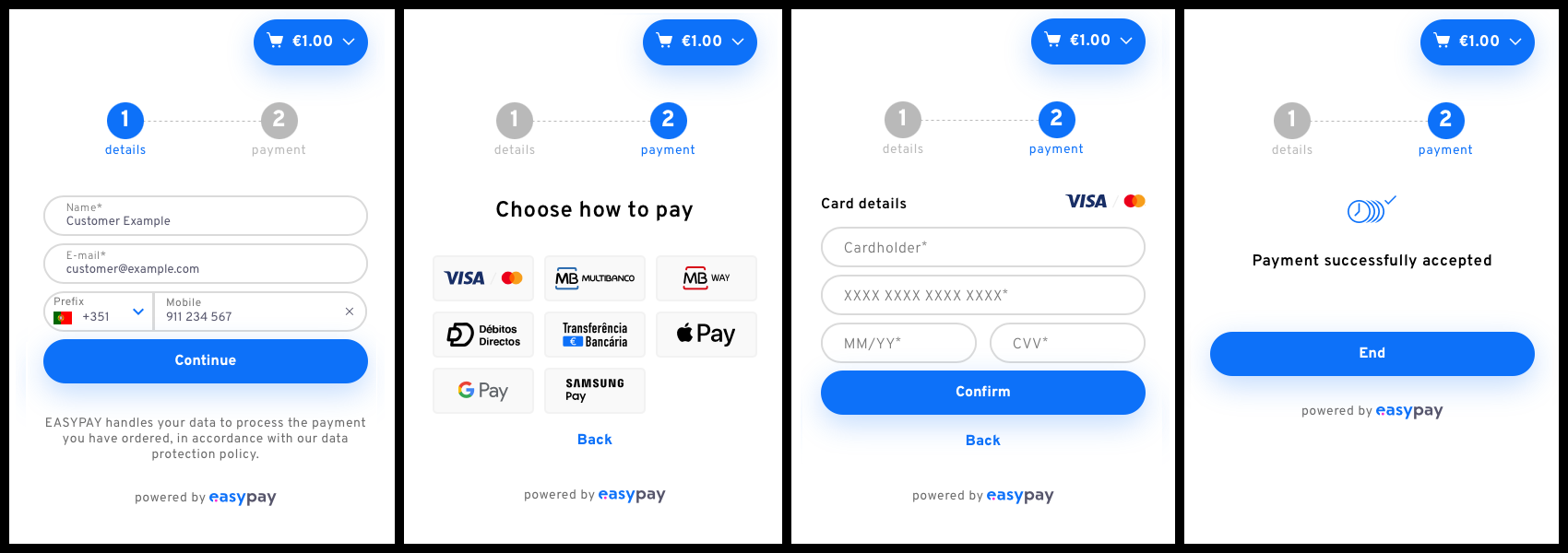
Checkout is a pre-built payment form that you can embed directly into your website. It handles the entire payment flow including:
- Collecting customer information
- Payment method selection
- Payment information collection
- Invoking payment APIs
- Displaying payment feedback
## Key Benefits
- **No extensive programming required**: Embed with just a few lines of code
- **All payment methods supported**: Credit cards, MB WAY, Apple Pay, Google Pay, Samsung Pay, Multibanco, Direct Debit, Virtual IBAN
- **All payment types supported**: Single, Frequent, and Subscription payments
- **Fully customizable**: Match your brand with extensive styling options
- **Mobile responsive**: Works seamlessly on all devices
- **Multiple integration methods**: Script tag or NPM package
## Live Demo
Explore the [live Checkout demo](https://checkout-demo.easypay.pt) to see the solution in action and try different payment flows.
View the [source code on GitHub](https://github.com/Easypay/checkout-demo) with instructions for running locally.
## How It Works
### 1. Create a Checkout Session (Server-Side)
Make a server-to-server POST request to create a checkout session:
```bash
curl -X POST 'https://api.test.easypay.pt/2.0/checkout' \
-H 'AccountId: YOUR_ACCOUNT_ID' \
-H 'ApiKey: YOUR_API_KEY' \
-H 'Content-Type: application/json' \
-d '{
"type": ["single"],
"payment": {
"methods": ["cc", "mb", "mbw", "dd", "vi"],
"type": "sale",
"currency": "EUR"
},
"order": {
"items": [
{
"description": "T-shirt",
"quantity": 1,
"key": "t-shirt",
"value": 12.50
}
],
"key": "order-123",
"value": 12.50
}
}'
```
Response:
```json
{
"id": "57cc19e9-f393-4cfa-9516-8807763b5096",
"session": "8zoaBOC0Mj5Mg_YAbdRCqY...",
"config": null
}
```
This response is called the **Checkout manifest**.
### 2. Display the Checkout Form (Client-Side)
#### Option A: Script Tag (Simplest)
```html
```
#### Option B: NPM Package
```bash
npm install --save @easypaypt/checkout-sdk
```
```javascript
import { startCheckout } from "@easypaypt/checkout-sdk";
const manifest = await getManifestFromServer();
startCheckout(manifest);
```
## Common Use Cases
### Single Payment
For one-time purchases:
```json
{
"type": ["single"],
"payment": {
"methods": ["cc", "mbw", "mb"],
"type": "sale",
"currency": "EUR"
},
"order": {
"items": [
{ "description": "Product", "quantity": 1, "value": 29.99 }
],
"value": 29.99
}
}
```
### Frequent Payment (Tokenization)
To save payment details for future use:
```json
{
"type": ["frequent"],
"payment": {
"methods": ["cc", "mbw", "dd"],
"currency": "EUR"
}
}
```
Handle the success callback to get the payment ID:
```javascript
startCheckout(manifest, {
onSuccess: (checkoutInfo) => {
// Save checkoutInfo.payment.id for later captures
saveTokenToServer(checkoutInfo.payment.id);
}
});
```
Later, capture funds using the saved ID:
```bash
POST /capture/:id
{
"value": 50.00,
"descriptive": "Purchase in MyStore"
}
```
### Subscription Payment
For recurring payments:
```json
{
"type": ["subscription"],
"payment": {
"methods": ["cc", "dd"],
"type": "sale",
"frequency": "1M",
"start_time": "2024-02-01 00:00",
"max_captures": 12
},
"order": {
"items": [
{ "description": "Monthly Subscription", "value": 9.99 }
],
"value": 9.99
}
}
```

## Advanced Features
### Display Modes
**Inline Mode** (default): Embeds the checkout form in your page
```javascript
startCheckout(manifest, {
display: "inline"
});
```
**Popup Mode**: Opens checkout in a popup/modal
```html
```

### Event Handlers
React to payment events:
```javascript
startCheckout(manifest, {
onSuccess: (checkoutInfo) => {
console.log('Payment successful:', checkoutInfo);
// checkoutInfo contains payment details, method, status, etc.
},
onError: (error) => {
console.error('Unrecoverable error:', error);
if (error.code === 'checkout-expired') {
// Create new session
}
},
onPaymentError: (error) => {
console.log('Recoverable payment error:', error);
// User can retry
},
onClose: () => {
console.log('Checkout closed');
// Clean up or redirect
}
});
```
### Customization
Match your brand with extensive styling options:
```javascript
startCheckout(manifest, {
logoUrl: "https://yoursite.com/logo.png",
accentColor: "#FF6B35",
backgroundColor: "#F7F7F7",
buttonBackgroundColor: "#FF6B35",
buttonBorderRadius: 5,
inputBorderRadius: 5,
fontFamily: "Arial, sans-serif",
baseFontSize: 12
});
```
Example customization:

Available customization options:
- Company logo
- Background colors
- Accent colors
- Button colors and styles
- Input field colors and styles
- Font family and size
- Border radius
- Box shadows
## Testing
To test without real transactions:
```javascript
startCheckout(manifest, {
display: "inline",
testing: true // Use test environment
});
```
**Important**:
- Create sessions using `https://api.test.easypay.pt`
- Use test payment methods (see [Payment Methods guide](/docs/guides/payment-methods))
- Remove `testing: true` when going to production
## Managing Checkout Instance
Store the instance for later management:
```javascript
const checkoutInstance = startCheckout(manifest, {
onSuccess: (info) => {
// Payment successful, clean up
checkoutInstance.unmount();
showThankYouMessage();
}
});
// Later, manually remove checkout
checkoutInstance.unmount();
```
## Session Expiration
Checkout sessions expire after **30 minutes**. Handle expiration gracefully:
```javascript
startCheckout(manifest, {
onError: async (error) => {
if (error.code === 'checkout-expired') {
// Create a new session
const newManifest = await createNewSession();
startCheckout(newManifest);
}
}
});
```
## Error Codes
| Error Code | Cause | Solution |
| --- | --- | --- |
| `checkout-expired` | Session expired (>30 min) | Create new session |
| `already-paid` | Checkout already completed | Confirm payment status |
| `checkout-canceled` | Checkout was canceled | Create new session |
| `generic-error` | General error before payment | Allow retry |
| `payment-failure` | Error during payment | Allow retry, check details |
## Supported Languages
Checkout automatically detects the user's browser language, but you can override it:
```javascript
startCheckout(manifest, {
language: "pt_PT" // Portuguese
// Options: "en", "pt_PT", "es_ES"
});
```
## Best Practices
1. **Always Create Sessions Server-Side**: Never expose your API keys in client code
2. **Handle All Error Cases**: Implement error handlers for better UX
3. **Use Webhooks**: Don't rely solely on client-side success callbacks for critical logic
4. **Test Thoroughly**: Use the test environment extensively before going live
5. **Customize for Your Brand**: Match Checkout to your website's look and feel
6. **Mobile First**: Test on various devices and screen sizes
7. **Verify Payments**: Always verify payment status on your server using the API
## Next Steps
- [Checkout API Reference](/openapi#tag/Checkout) - Complete API documentation
- [Webhooks Guide](/docs/guides/webhooks) - Receive payment notifications
- [Payment Methods](/docs/guides/payment-methods) - Learn about available payment methods
- [Payment Types](/docs/guides/payment-types) - Understand Single, Frequent, and Subscription payments
- [GitHub Demo](https://github.com/Easypay/checkout-demo) - Full working example
## SDK Reference
For complete SDK options and parameters, see the [Checkout API Reference](/openapi#tag/Checkout).
Key SDK methods:
- `startCheckout(manifest, options)` - Initialize checkout
- `checkoutInstance.unmount()` - Remove checkout from DOM
For detailed SDK documentation including all customization options, callback parameters, and examples, refer to the [API Reference](/openapi#tag/Checkout/SDK).